


Synology Business Solutions for Secure and Efficient Data Management
Businesses need reliable, secure, and scalable data storage to manage growing information, protect critical files, and improve operational efficiency. Synology business solutions help organizations simplify data management through network-attached storage (NAS), backup and recovery, networking, and cloud integration.
Tech365, a VAR of Princeton IT Services, helps businesses explore Synology storage and data protection solutions designed to support business continuity, secure collaboration, and long-term IT growth.
1. Synology NAS and Business Storage Solutions
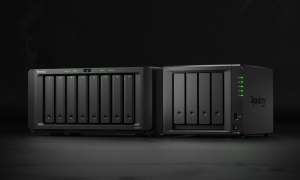
Synology NAS storage provides centralized file storage, sharing, and data management for businesses of different sizes. Tower and rackmount systems offer flexible options for offices, enterprise IT environments, and growing organizations.
Centralized Storage
Organize business files in a central location to simplify access, sharing, and management.
Scalable Capacity
Choose storage configurations that can accommodate growing data requirements.
Data Protection
Use supported snapshots, replication, and backup capabilities to protect business information.
Flexible Deployment
Explore tower and rackmount NAS options for different business workloads and IT environments.
Key Benefits of Synology NAS
- ✓ Centralized business file storage and sharing
- ✓ Scalable storage capacity for growing data requirements
- ✓ Supported snapshots, replication, and backup capabilities
- ✓ Flexible deployment options for different workloads
2. Network Solutions and Secure Remote Access
Reliable connectivity helps employees access business resources securely across locations. Compatible Synology networking products and software support selected networking, VPN, and remote-access requirements.
Secure Remote Access
Help authorized employees connect to business resources from supported remote locations.
Network Integration
Integrate compatible solutions into your existing business IT infrastructure.
Remote Team Connectivity
Support distributed teams with connectivity and access options aligned with business needs.
Businesses can improve network management, support remote teams, and integrate compatible solutions into their existing IT infrastructure.
3. Cloud Backup and Data Protection
Business data backup and recovery are essential for reducing downtime and protecting against accidental deletion, hardware failures, and ransomware incidents.
Synology’s supported backup and cloud integration capabilities can help organizations protect critical information and strengthen their recovery readiness.
Pro Tip: Strengthen Your Backup Strategy
Maintain independent backup copies and test recovery procedures regularly to strengthen business continuity and ransomware resilience. A backup strategy should also define recovery priorities and acceptable downtime for critical systems.
4. Storage Expansion and Add-On Solutions
As businesses grow, their storage infrastructure must accommodate increasing data volumes and performance requirements. Synology offers compatible storage drives, expansion options, and accessories to support different business needs.
Storage Drives
Select compatible drives to meet capacity, reliability, and workload requirements.
Expansion Options
Plan for additional storage capacity as business data volumes increase.
Compatible Accessories
Evaluate supported accessories for your specific Synology model and deployment.
What to Consider Before Expanding Storage
- ✓ Usable storage capacity and redundancy
- ✓ Workload performance requirements
- ✓ Hardware and drive compatibility
- ✓ Future business growth and expansion needs
Assess usable capacity, redundancy, workload performance, compatibility, and future growth before selecting a business storage solution.
5. Why Choose Tech365 for Synology Solutions?
Tech365 helps businesses evaluate Synology business storage and data management solutions according to their infrastructure, security, and budget requirements.
Infrastructure Assessment
Review storage requirements, existing infrastructure, and business objectives.
NAS Hardware Selection
Evaluate suitable Synology NAS systems and configurations for your environment.
Backup Planning
Identify data protection and recovery requirements for important business information.
Scalability Guidance
Plan storage capacity and expansion options around future growth.
Implementation Planning
Align solution selection and deployment planning with business and IT objectives.
Whether your organization needs centralized file storage, secure backups, or scalable network storage solutions, Tech365 can help you identify suitable options for your IT environment.
6. Improve Business Data Management with Synology
Synology business solutions help organizations manage data more efficiently with centralized storage, backup capabilities, network connectivity, and scalable infrastructure. Choosing the right configuration can improve data accessibility, simplify IT management, and support business continuity.
Your Business Data Management Checklist
- ✓ Centralize business file storage and access
- ✓ Establish dependable backup and recovery procedures
- ✓ Review remote-access and network security requirements
- ✓ Plan storage expansion around future workloads
Improve Your Business Data Management with Tech365
Explore Synology NAS storage, backup, and data protection solutions tailored to your business infrastructure, security needs, and growth plans.